
A lending buyer opens your demo. The welcome screen mentions lending, but the first record is a sales opportunity with a renewal date. Your rep spends the next minute explaining what each field would mean in the buyer's business. That's translation work the demo should have done.
Build realistic product demo data around a buyer's decision, not around filling empty screens. Create synthetic records that make the problem, action, and outcome visible, then adapt the terminology, relationships, and exceptions that genuinely differ by industry.
I wouldn't start with a large sample database. I'd start with the record your rep opens when a prospect asks, “Can you show me how that would actually work?” If that record doesn't hold up to inspection, a busier dashboard won't help.
What makes product demo data believable?
Believable product demo data has consistent relationships and a reason to exist. The buyer should understand why a record needs attention and what changes when someone acts on it.
Product demo data: The sample records, values, statuses, and relationships used to demonstrate a product. A useful demo dataset supports a coherent scenario, rather than simply making the interface look populated.
Consider an illustrative lending workflow: an application is ready for review but has no assigned reviewer. The queue shows it as unassigned. Its history explains when it became ready. After assignment, the record names the reviewer and the unassigned queue no longer includes it.
Nothing spectacular happens. That's the point. The screens agree, so the buyer can concentrate on whether the workflow solves their problem.
Now imagine the application still appears in the unassigned queue afterward. A live presenter might explain a refresh delay. In a self-serve product tour, the buyer has only the evidence on screen. Interactive demo software can guide attention, but it can't repair a contradictory story.
What should change between industry demo scenarios?
Change the details that affect how the buyer interprets the work. Keep shared mechanics only where the action and its meaning remain the same.
Renaming “customer” to “patient” isn't industry personalization if the rest of the screen still describes a retail checkout. Equally, there's no need to reinvent a filter interaction for every vertical. The useful distinction is between interface mechanics and business meaning.
| Layer | Often reusable | Check for each industry |
|---|---|---|
| Navigation | Open, filter, sort | Which fields help someone decide |
| Ownership | Assign and reassign | Responsible roles and eligibility |
| Status | Move between stages | Valid transitions and completion criteria |
| Exceptions | Flag a blocker | What causes it and who can resolve it |
| Reporting | Aggregate and drill down | Which result demonstrates progress |
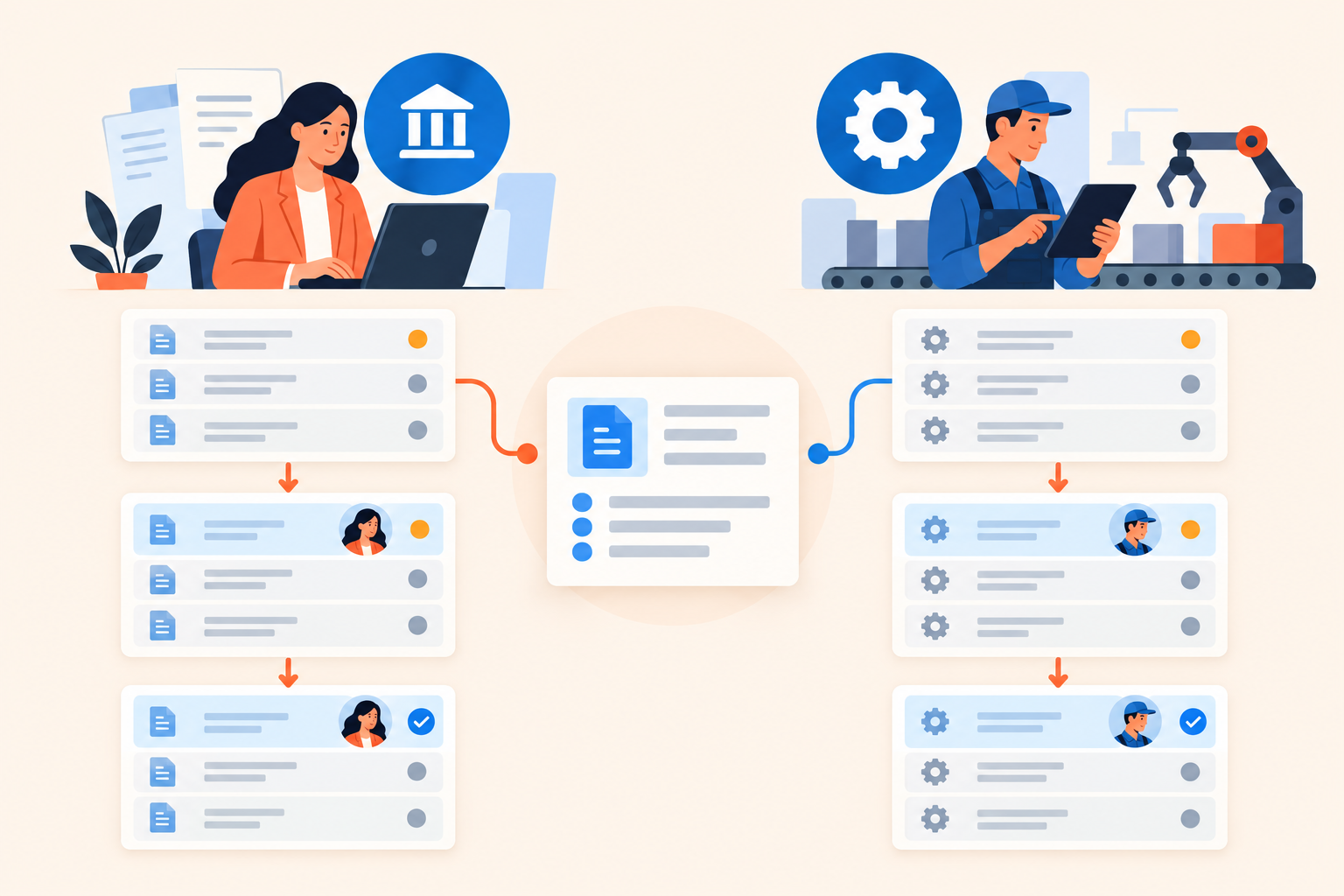
A lending application and a manufacturing service request might both need an owner. But assigning the application to a reviewer isn't the same business event as dispatching a technician. Required information, permissions, and next steps may differ.
My rule: create an industry version when the generic version makes the buyer mentally rewrite the workflow. Otherwise, keep the shared asset. A basic interaction belongs in a reusable product tour; a claim about industry relevance needs industry-specific evidence.
How do you build a demo dataset without overbuilding it?
Work backward from one visible outcome and create only enough surrounding data to make that outcome credible. Add an exception that tests a real product capability, not an elaborate subplot.
- Write the buyer's question. “Which review-ready applications have no owner?” is a scenario. “Show the dashboard” is an instruction to the presenter.
- Define the starting state. Specify why the main record needs attention. In our example, the application is ready for review but unassigned.
- Build the main record. Give it a plausible status, submission date, history, and required fields. Don't fill every notes field with distracting prose.
- Add contrast. Include surrounding records that are already assigned or not yet ready. Now the filter proves something instead of returning every row.
- Choose an exception. Perhaps another application is missing a document and shouldn't enter the review-ready queue. Show how the product distinguishes it, if it actually can.
- Specify the ending state. Write down exactly what changes after assignment and what stays unchanged. Check both the detail view and the queue.
The exception is where teams often overpromise. If the product flags missing information but doesn't obtain it automatically, stop at the flag and the supported next action. Don't let a convenient jump between screenshots imply automation that doesn't exist.
Keep a short scenario brief beside the assets: buyer question, starting state, main record, action, exception, ending state. Add the fields that must match across captures. This becomes the reference when a marketer edits the narration or an SE replaces a screenshot.
You don't need a fully simulated business. You need enough coherent evidence for the buyer to evaluate the claim.
How can you reuse the scenario across personalized demos?
Reuse the scenario rules before reusing the exact records. Share an asset only when its terminology and evidence still make sense for every audience receiving it.
For example, “find work without an owner” might be a shared story structure. The lending version uses applications and reviewers; the manufacturing version uses service requests and technicians. Those versions may need separate captures even if the underlying assignment control is identical.
Dale, the demo automation platform, supports this approach through reusable Pages. Each Page represents a topic or pain point and can appear in multiple demos. A genuinely shared explanation can stay in one place, while industry-specific evidence gets its own Page.
Prepare the application states outside the demo platform. Capture screenshots or record videos using your own tools, then add the content. Reusable Pages aren't a dataset generator, and routing a viewer doesn't rewrite the records inside a screenshot.
When should you use a Branched Demo?
Use a Branched Demo for industry or role-based routing when the buyer's answer changes which prepared experience they should see. Preset choices send viewers to the matching Linear Demo or Basic Demo.
Don't ask for an industry if every answer leads to effectively the same story. That creates an expectation of relevance without delivering it. One useful branch is better than a menu of distinctions your content doesn't support.
Where do Walkthroughs fit?
Use Walkthroughs when clicking through the interaction helps the buyer understand it. They're built from screenshots with tooltips and highlighted areas, so continuity between captured states matters.
A tooltip saying “Assign reviewer” cannot compensate for the reviewer field remaining blank on the next screen. Review the screenshots in order without narration before adding guidance.
How should the data work when buyers choose different topics?
Each optional topic needs a self-contained scenario, and its short and detailed versions should use the same underlying facts. Personalizing depth should change the explanation, not the identity of the record or the outcome.
In a Linear Demo with buyer-selected priorities, viewers rate topics Important / Somewhat Important / Not Important. Important topics play first. Pages have a detailed-video placeholder for Important and a shorter-video placeholder for Somewhat Important; Not Important skips the topic.
For our assignment example, the short version could establish the unassigned application, show the assignment, and confirm the changed queue. The detailed version could inspect the same application's history and explain the filter before reaching the same ending state.
One video can serve both ratings. I would do that rather than produce a longer version with no additional decision-making value.
The harder issue is dependency. “Remember the application we created earlier” fails when the viewer skipped that topic. Introduce the current state locally: “This application is ready for review, but nobody owns it yet.” That sentence lets the topic stand on its own without repeating the whole demo.
How do you check demo data for privacy and continuity?
Use purpose-built synthetic data as the default, then inspect every captured surface before publishing. Replacing customer names alone doesn't make a production environment safe to show.
Notes, attachments, email previews, browser tabs, and account identifiers can expose information you didn't intend to publish. Synthetic data also gives you control over the story without borrowing a customer's unusual circumstances.
Use this release checklist:
- Privacy: No unintended customer or personal information appears in records, files, notifications, or browser elements.
- Continuity: Owners, statuses, dates, and totals agree across related screens.
- Capability: Every action and implied result reflects supported product behavior.
- Context: Someone familiar with the industry recognizes the terminology and workflow.
- Independence: Optional topics make sense without an earlier topic.
- Maintenance: A named owner knows which assets depend on this scenario.
Dates deserve their own pass. “Due tomorrow” looks odd beside a calendar date from last year. Either establish a clear fixed scenario date or schedule a refresh of date-sensitive captures. Don't combine fresh narration with old screenshots and hope nobody notices.
Review shared assets before replacing them, too. A terminology change that improves one industry's demo may make another confusing. Reuse reduces maintenance only while the shared assumptions remain true.
How do you know whether the scenario is working?
Ask a reviewer to explain the problem and outcome without your narration. Then use viewer behavior to identify possible friction, not to declare the scenario successful automatically.
Ask a pre-sales colleague whether the product behavior is accurate. Ask someone familiar with the target industry whether the record is plausible. Those are different reviews; a technically correct workflow can still feel foreign to the buyer.
Useful questions include: “Why does this record need attention?”, “What would you check before acting?”, and “What changed afterward?” If the answers depend on information that only lives in your script, the screens need work.
After publishing, interpret Buying Intent Signals from demo engagement alongside those reviews. A rewatch may indicate buying intent, but it can also mean the viewer couldn't follow a status change. Inspect the content before treating every repeat view as enthusiasm.
Keep a small issue log separating confusing evidence from genuine workflow objections. Fixing a mismatched total is a content task. Discovering that the buyer needs a different approval path is a product or qualification conversation.
For a first build, inspect the Dale interactive demo to see how topic selection affects the experience, and check Dale pricing for the demo types your plan requires. Then open your most-used demo, choose its central record, and trace it from the opening problem to the final screen. Fix the first contradiction before recording another industry version.